For five years we kept our family accounts in Money OK. It's a good app: log a purchase, pick a category, and there's a budget page with its own tricks. But I wanted everything in one place and on our own rules: money in several currencies, assets, goals, side projects, and exploring investment options. I didn't even look for a ready-made product like that. Why would I, with Claude around? I've already written that it can build apps and even videos. So I decided to give it a go.
On November 23 I opened a new project in Claude and typed roughly what was in my head:
"Here we'll track, analyze and learn about personal and family finances. Let's make a dashboard or something like that to track money, learn to save, set money aside, invest."
Not a model prompt. But it already has three goals in it: track, save, invest.
Questions first, code later
Claude didn't jump straight into coding a dashboard. It asked a few multiple-choice questions: what form the result should take, how many currencies, whether to split personal and shared money, where the data would come from. I picked a spreadsheet with a dashboard, several currencies, personal separate from shared, and promised to send an export.
Then I dropped in the Money OK export and set the base currency along the way:
"I think we need a project folder on my computer. Currency: som."
That's how the project folder on my Mac and the Kyrgyz som as the main currency came about.
The spreadsheet lasted one day
The first version was a spreadsheet Claude built through the Claude Docs connector. I picked that format. The spreadsheet worked, but it was clear right away that it was awkward to use:
"We need a proper dashboard built on this exact spreadsheet, so I can both see and enter data, like in an app."
That's where everything changed. Claude offered a few options and marked one as recommended: a standalone app. We archived the spreadsheet; it was only needed to get started.
Why does the app have its own database instead of the same spreadsheet? The reason is technical: an artifact page can't call the Claude Docs connector on its own. Only Claude in the chat has those tools. To see and enter data from a phone, the page needs its own storage.
The phone shaped the whole app. I asked:
"Will I be able to open it from a link on my phone? Say, add an icon to the iPhone home screen from Safari?"
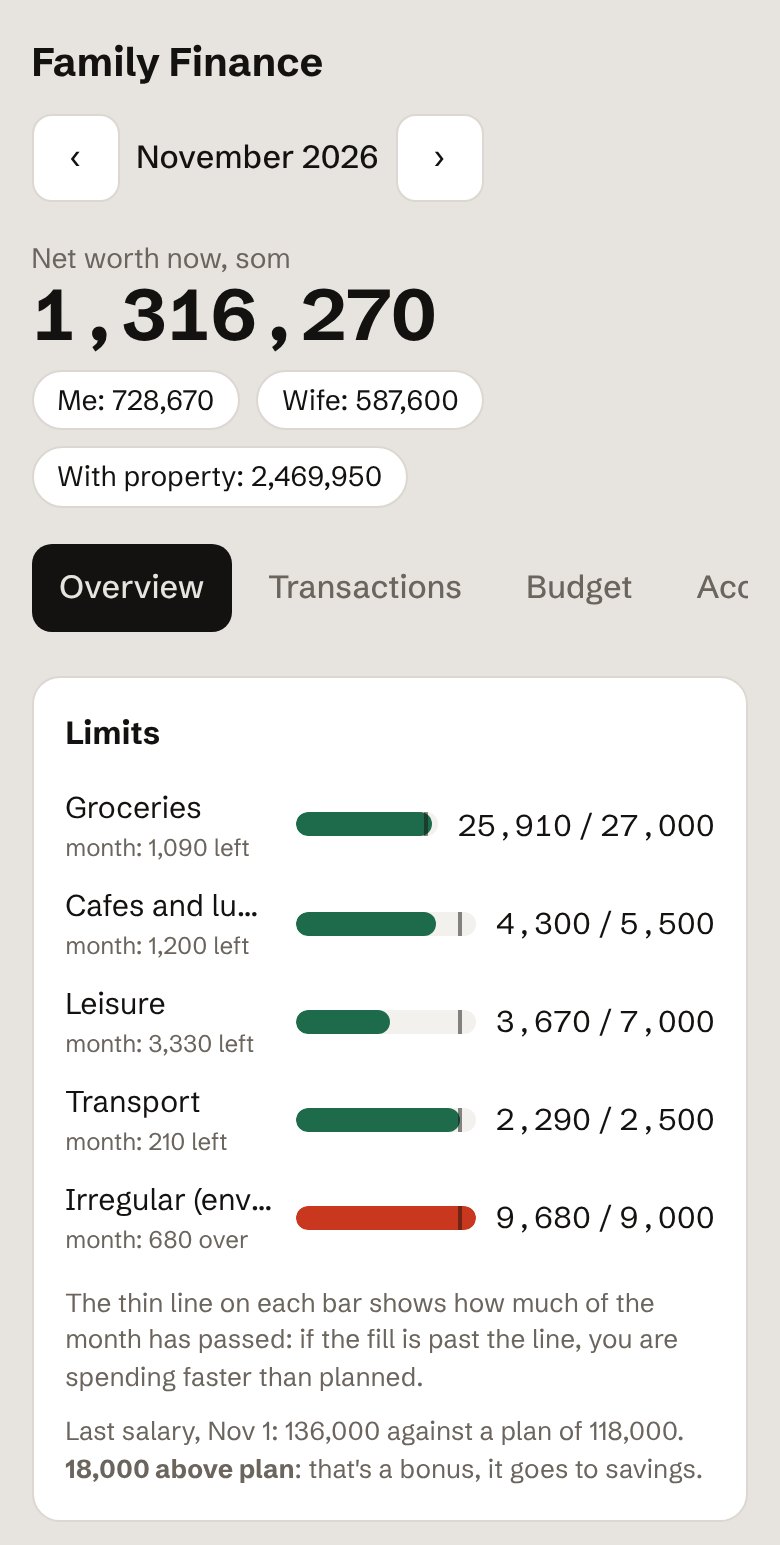
Yes. So the whole interface was laid out for a narrow screen: tabs at the top and a big "+ Transaction" button at the bottom. The screenshots in this post are based on made-up data.
Moving out of Money OK
The move took the most effort.
- Cleanup. 8,760 rows since June 2021, 22 accounts.
- Transfers between accounts. In Money OK, a transfer between your own accounts is one row. In proper bookkeeping it's two transactions, a debit and a credit linked by a shared key. After splitting them we had 10,062 transactions.
- Opening balances. The history doesn't start from zero, so 14 accounts needed an "Opening balance" transaction. Claude calculated them so that every account balance matched Money OK as of November 23.
- Exchange rates. For each past month we used the median of our own currency exchanges; for the current month, the National Bank rate.
- Categories. Business went into a separate circuit so it doesn't mix with personal money. Debts and loans are separate too: they're neither income nor spending. Large purchases and sales were taken out of the averages, otherwise one month with a big one-off sale or purchase breaks all the stats.
Some of the data Claude couldn't make sense of, so I explained what was what:
"Yes, that was selling the old computer and something else in July."
And about one transaction I answered honestly:
"No idea, I don't remember what that was..."
After these fixes Claude recalculated the yearly averages, and income came out noticeably lower than in the first version.
How I set tasks
Rereading my messages, what worked best was describing the situation along with a doubt. Here's an example. Claude suggested logging my salary bonus as a separate line. I replied:
"Hmm... well if we have to, let's do it like this: I'll log how much salary came in and how much bonus... But damn, it all arrives as one amount after tax... Maybe we don't need to bother? Let it all just be salary? Let's say I'll try to save the whole bonus. And we also need to put the most important regular variable expenses on the main screen."
"Maybe we don't need to bother?" gave Claude permission to propose a different solution. It agreed that a separate line was extra work on every entry and did it differently: the app works out on its own how much came in above plan. The second half of the message got variable expenses and their limits onto the main screen.
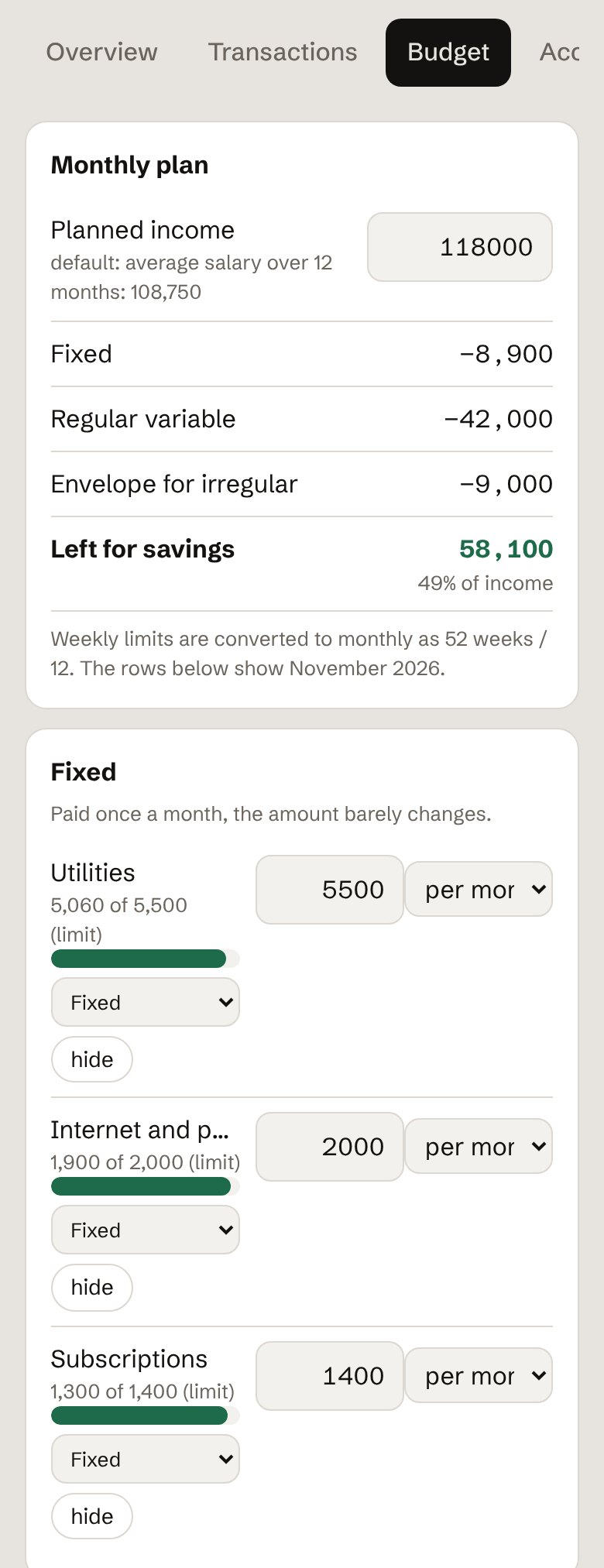
The budget came about the same way. I asked how to set limits:
"Limits, you're saying per week? Is that more convenient, or is a month better? Since spending on [...] is monthly, and utilities, internet and so on are almost fixed."
In response Claude proposed three groups of spending. Fixed, each with its own limit. Regular variable, also with limits. And everything irregular in one shared envelope. The app can calculate weekly limits, but later I switched everything to monthly myself, so the screen has one scale. I told Claude after the fact.
Two more tabs came the same way, and without them the app would be just another budget tracker:
"I think the investing part can start slowly, with bonuses actually. And that needs a new tab in the app, and we also need to plan learning based on my data."
Who came up with what
From the chat history, it breaks down like this:
- Mine: the starting format, the switch to an app, the phone icon, limits on the main screen, the assets tab, learning, dropping the separate bonus line, monthly limits instead of weekly.
- Claude's: the three spending groups and the shared envelope, the month pace marker on the limit bars, two net worth figures (free money separate from property), progress toward goals, hour tracking for side projects, balance adjustments for accounts that only get updated "every now and then".
- Came up once I started using it: entering transactions from a receipt (I sent a photo of a supermarket receipt and Claude split it into three categories), a field for income I can direct to a goal, lowering the monthly goal amount after the numbers were in.
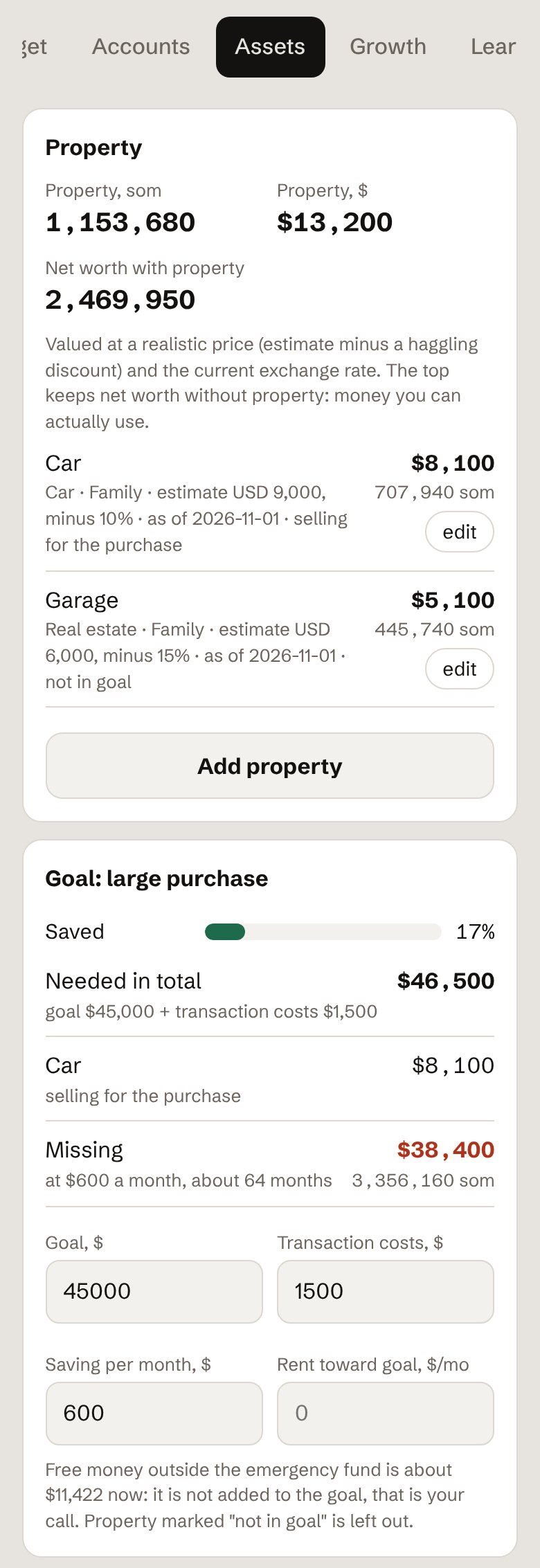
Assets came from a simple question: "Should we add an assets tab?" Claude suggested valuing property at a realistic price: the estimate minus a haggling discount, at the current exchange rate. And showing net worth without property at the top, meaning money we can actually use. For a large purchase you can see how much is missing and how many more months of saving it takes.
To keep the estimates from going stale, on the 1st of every month Claude checks comparable listings and sends a price summary.
Analysis across all the years needed one more trick. Pulling five years of transactions through the chat is slow, so Claude added a summary calculation to the page: totals by category and month, spending by day of week. The page recalculates it once a day when opened and saves it to the database, so Claude reads one document instead of every month.
Learning
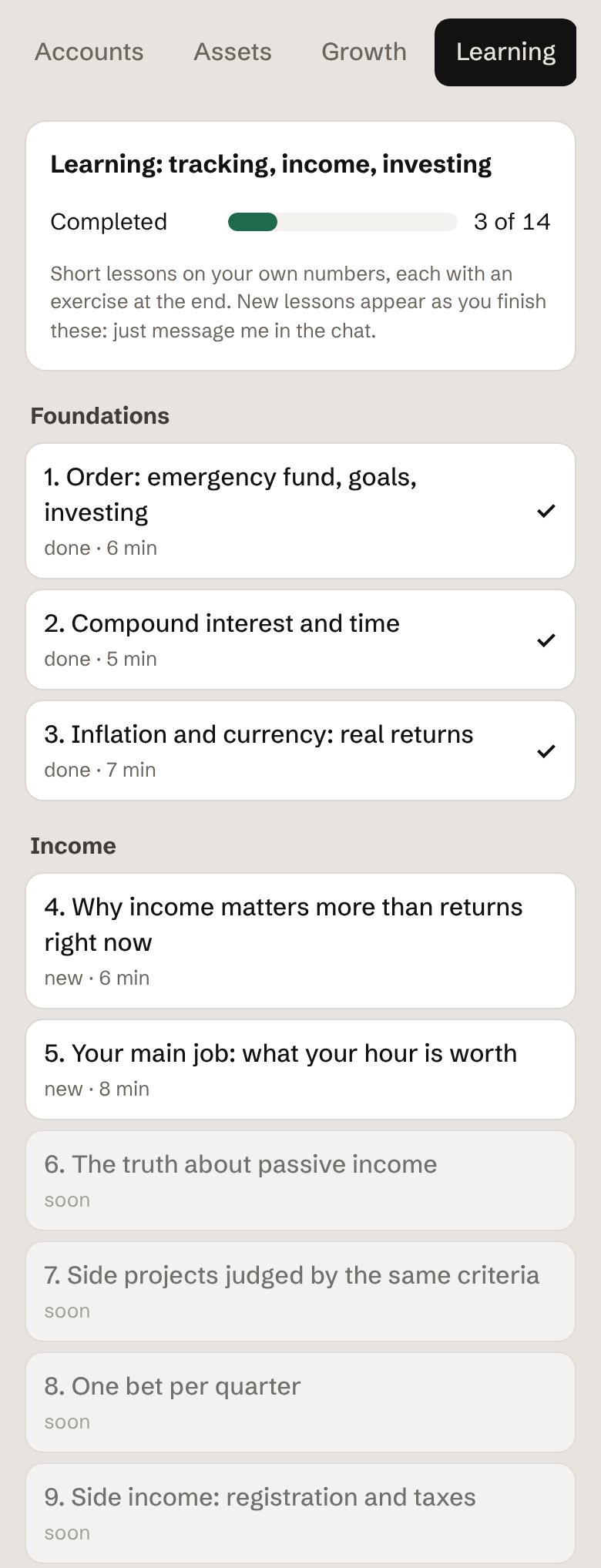
I suggested the lessons, Claude proposed the structure: short, on our own numbers, with an exercise at the end. The first program had 8 lessons, all about investing. Then I wrote:
"Let's plan the learning in more detail? And ways to increase income, including passive, and not just investing."
Claude calculated three things on our data: the gain from better deposit rates, the savings from cutting one spending category, and a salary raise. The first turned out to be several times smaller than the other two. The program was rebuilt into 14 lessons: foundations, income, and only then investing.
Claude looked up market figures online: inflation and the National Bank rate, job listings for the lesson on what my hour is worth (with an honest note that these are individual listings, not statistics). Prices were a different story. When we estimated grocery spending, Claude used the National Statistics Committee's average prices. I replied:
"The statistics on these goods are lying."
And gave the prices from the store next door.
With my real prices the estimate went up by a third. And for one spending category the conclusion flipped completely: spending grew because of prices, not because we were buying more.
How we tested
Claude tested the page without a browser. Before every publish, the page ran in jsdom with a mock in-memory database that behaved like the real one. Scripts clicked through tabs and forms, saved data and checked exactly what ended up in the database. In the latest version, the mock database deliberately failed if an empty value got into a write. That's how a bug in the hours form surfaced before publishing: an empty comment was being saved as undefined.
In a separate chat about assets, Claude only checked the syntax, without running scenarios. That's weaker.
I tested my own way: from my phone, on live data. I often entered or changed something myself and asked: "I updated it myself, OK?" Claude read the document from the database and confirmed.
Bugs we found:
- The migration overwrote months. Categories were fixed with one-off corrections that the page applied on load. The first version overwrote months that hadn't been saved yet. The nastiest bug: it could make data silently disappear.
- The bonus was calculated wrong when two salaries landed in the same month (on the 1st for the previous month and on the 30th for the current one). We switched to comparing the latest payment.
- Version conflicts. While Claude was writing to the database from the chat, I was editing the same data from my phone, and its write got rejected. Hence the rule: before any write, read the document first and take the fresh version.
Where Claude got it wrong and where I changed my mind
Claude made mistakes too. It counted twice the money that comes back from deposits in spring, and added it to the goal. It noticed in its next reply. It trusted average prices over ours. In a lesson draft it wrote that my raise was "already agreed", when I'd written "they should raise it": it caught that itself before publishing. And on November 26 it wrote the context files from memory without rereading the project document, and lost the assets section.
I changed my mind too, and that's fine:
- spreadsheet → standalone app;
- bonus as a separate line → "let it all just be salary";
- weekly limits → monthly;
- unneeded lines in the monthly budget → out: "I barely use taxis since the move, and monthly gifts can go too."
How long it took
Four days. A working version was ready by the evening of day one; the rest went into polish. November 23 was the main day: the move, the spreadsheet, the app, the budget, deposits, investing, learning, the first five lessons, and in the evening the assets tab in a separate chat. On the 24th we finished goals and the all-years analysis, on the 25th we worked through groceries and the supermarket receipt. On the 26th the context files appeared.
What I took away
At work I write documentation and dig into why an AI support agent gives wrong answers. At home it turned out I needed exactly the same:
- Context files. From day one Claude kept a project document with decisions and numbers, and later we added more context files in a local folder. A new chat reads them when needed and is up to speed immediately.
- Dated decisions. Six months from now I won't have to remember why a limit is set the way it is.
- Checking numbers. Anything about rates, taxes and laws gets checked against fresh, dated sources. With family money I don't take anything on faith.
If you want to build something like this for yourself, here's what I'd suggest. Half of these tips, by the way, came from Claude when I asked it to look back on the project:
- Start with an export of real data, not with design.
- First agree on the boundaries: whose accounts, where business ends and salary begins, what counts as a large purchase. Otherwise the averages will lie.
- Match the balances of every account against the old app. If even one doesn't match, it's too early to build further.
- Make data entry something you'll actually use every day. Anything that adds an extra step to every transaction, throw it out.
- Give the AI real market prices, even if you have to photograph every shelf in the supermarket.
- Describe the situation and the context, or voice a doubt if you have one.
What's next
Every day I open the app on my phone to log spending and check the limits on the main screen. Next up are the lessons on income. The lesson on registering side income and taxes is on hold: Claude finds the current rules first, then we write it.